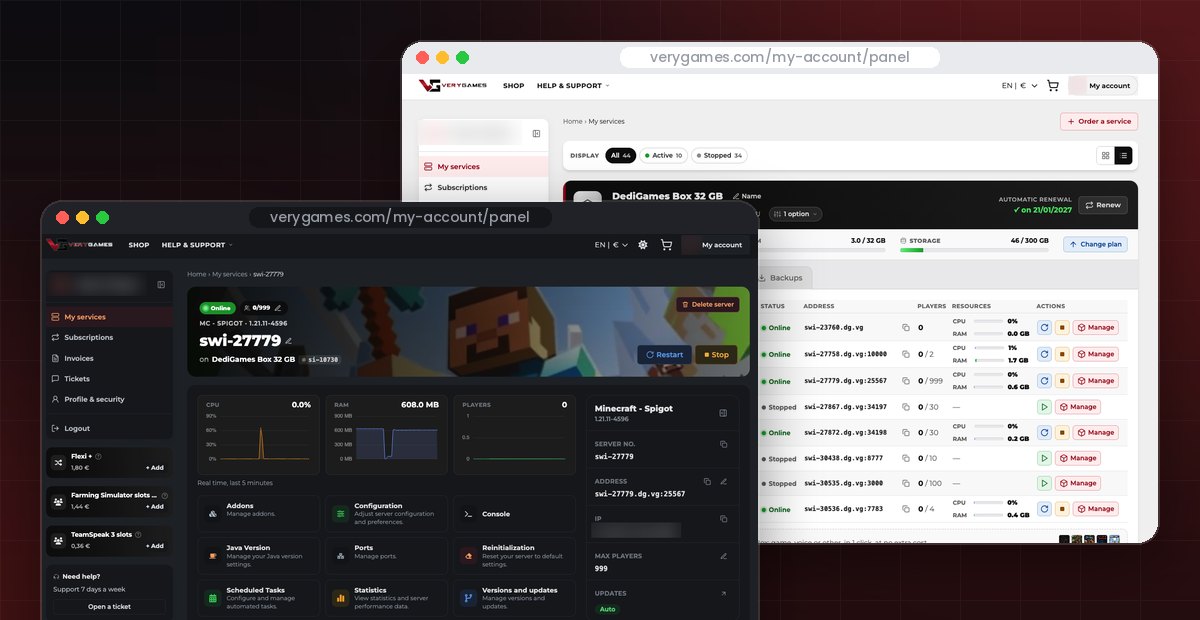
Your New VeryGames Panel Is Live, Now with Dark Mode
Level up! Your game panel now lives right inside your VeryGames customer account. Servers, subscriptions, invoices and tickets: everything is now in one place, with a faster and simpler interface.
And there is more: Dark mode is here, on the website and in your panel. Pick Light or Dark in a single click.
One place for everything you manage
Until now, managing your game servers and managing your account meant jumping between different screens. The new panel brings it all together in your VeryGames customer account, so you can go from your server to your subscription, an invoice or a support ticket without leaving the page.
⚡ Faster
Pages load ahead of time. Less waiting, more playing.
▶️ Simpler
No more activating a server by hand: start it in one click.
🎨 Redesigned
A fresh interface, built around your servers.
Your servers are all there: only the way you access them has changed.
🌙 Choose your side: Light or Dark
Dark mode is now available on verygames.com and in your panel. By default, the site follows the theme of your device. To choose, click the theme icon in the header at the top of the page. Your choice is remembered in your browser, and one more click takes you back.
Late-night session? Go dark. Your eyes will thank you between two raids. Team Light or team Dark? Tell us on our Discord.
How to open your new panel
- Log in to your account on verygames.com.
- Click My account at the top of the page: it takes you straight to your panel.
- Find your servers under My services, next to Subscriptions, Invoices and Tickets. Pick one and start it in one click. That's it.
And this is just the start 👀
More features are coming soon. Good or bad, your feedback shapes what comes next: share it with our support or on Discord.
New panel FAQ
Where is the new panel?
It is built into your VeryGames customer account: click My account at the top of any page.
Do I need to do anything to keep my servers?
No. Your servers are already in the new panel. Only the interface has been redesigned.
How do I turn on Dark mode?
Click the theme icon in the header on verygames.com or in your panel. By default, the site follows the theme of your device.
How do I share feedback?
Contact our support or join us on Discord. Every piece of feedback helps us improve the panel.
Try the new panel today
Log in to your customer account and open your panel. No server yet? Start with a DediGames® Box: dedicated RAM and CPU for all your games, managed from this new panel.